Streaming • HBO Max

How to Access HBO Max

Set up Free VPN for HBO Max, choose a suitable location, and troubleshoot common network or IP-location errors while travelling.

HBO Max availability, catalogues, and account rules can vary by country. This guide explains how to choose a suitable VPN location while travelling and troubleshoot common proxy, playback, and location errors.


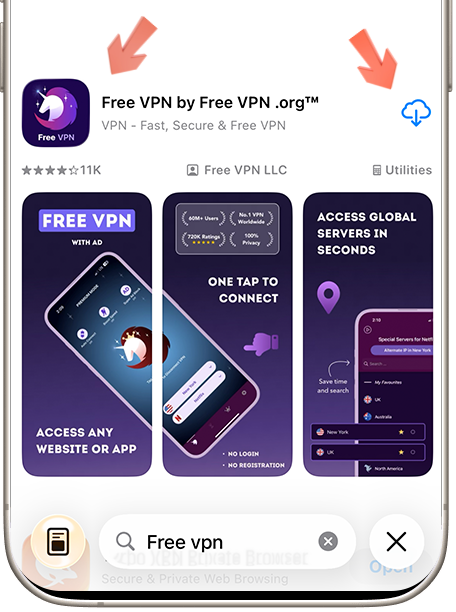
Step 1: Download Free VPN
STEP 1

Download Free VPN

Download Free VPN from the official store for your device. Review the current store listing for platform requirements, plan details, and privacy information before installing.

Available on Android, iOS & macOS
No registration required
100% free forever
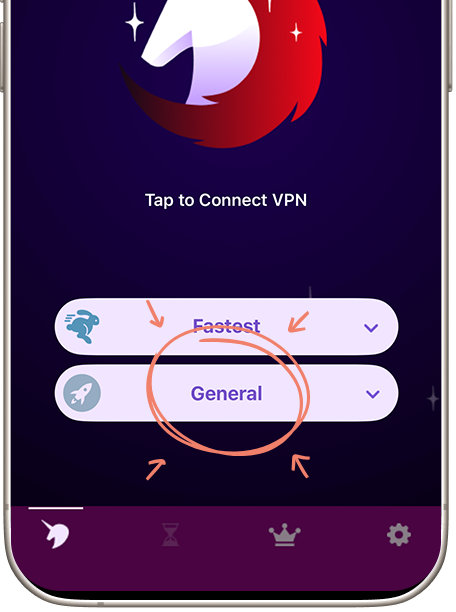
Step 2: Open Service Selector
STEP 2

Open Service Selector

Launch Free VPN and tap "Services" to view the presets currently available in your app version. Service availability and supported locations can change over time.

Easy-to-find Services button
Organized by categories
Search functionality included
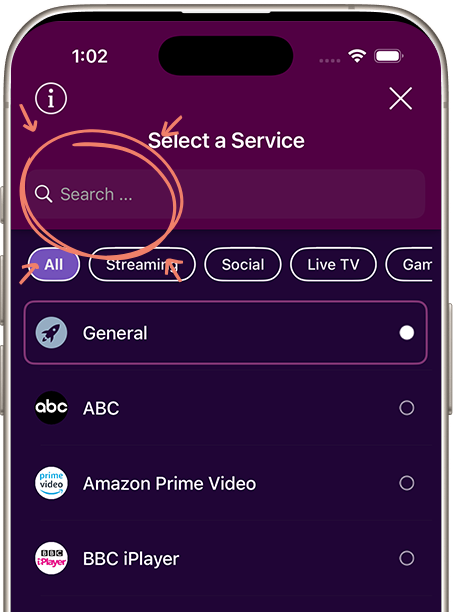
Step 3: Search for HBO Max and Connect
STEP 3

Search for HBO Max

In the services list, search for "HBO Max" or scroll through the Streaming category. Review the locations shown, choose one appropriate for your travel or troubleshooting need, and connect before reopening HBO Max.

Shows available locations for HBO Max
One-tap connection
Clear connection status before opening HBO Max
WHY FREE VPN

Using a VPN with HBO Max

Optimized Servers

Choose a nearby suitable location first. Shorter network routes often perform better, but speed varies by congestion, device, and internet provider.

Complete Privacy

A VPN encrypts traffic on the local network and changes the public IP address. It does not make an account or activity on HBO Max anonymous.

Smart Region Selection

Use the location list to test a legitimate IP-location mismatch. Confirm that HBO Max is officially available for your account and selected country.

Unlimited Access

If HBO Max reports a proxy or playback error, reconnect, try another eligible nearby location, clear stale app data, and check the provider's status.

FREQUENTLY ASKED

Questions about HBO Max

No. Availability depends on HBO Max, your account, country, subscription, and current VPN-detection rules. Free VPN can protect the connection and help diagnose a legitimate IP-location error, but it cannot guarantee access.

Use a nearby location where HBO Max and the content or feature you need are officially available. Check the provider's current availability and account rules before connecting.

No. A VPN encrypts traffic between your device and the VPN server and changes your public IP address. HBO Max can still associate activity with your account, device, cookies, or other identifiers.

Confirm that your account is eligible in the selected country, reconnect, try another nearby eligible location, restart the app or browser, and clear stale location data. If the error continues, check HBO Max support and terms.

Ready to Access HBO Max?

Protect your connection, choose a suitable location, and follow HBO Max availability, subscription, and account rules.