Streaming • SBS On Demand

How to watch SBS On Demand with Free VPN

Looking to watch SBS On Demand? Get Free VPN, find the service in the app, and follow the connection steps. Contact us if you need setup help.

Open Services in Free VPN and look for SBS On Demand or SBS, then connect.

Step 1: Download Free VPN
STEP 1

Download Free VPN

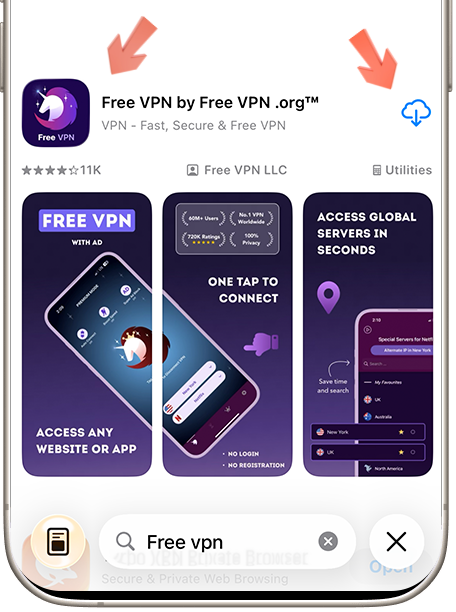
Download Free VPN from the official store for your device. Review the current store listing for platform requirements, plan details, and privacy information before installing.

Available on Android, iOS & macOS
No registration required
Free option shown in the official store listing
Step 2: Open Service Selector
STEP 2

Open Service Selector

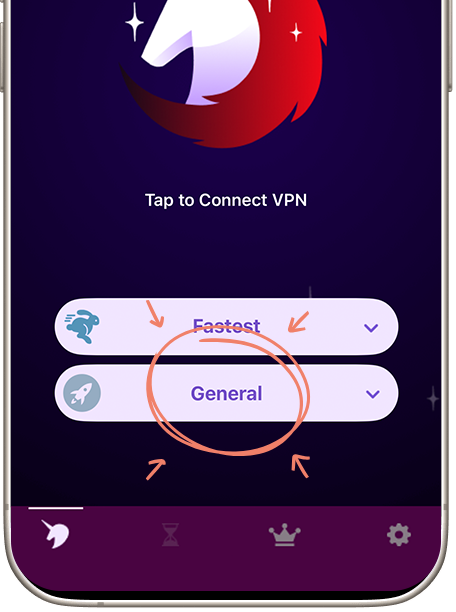
Launch Free VPN and tap "Services" to view the presets currently available in your app version. Service availability and supported locations can change over time.

Easy-to-find Services button
Organized by categories
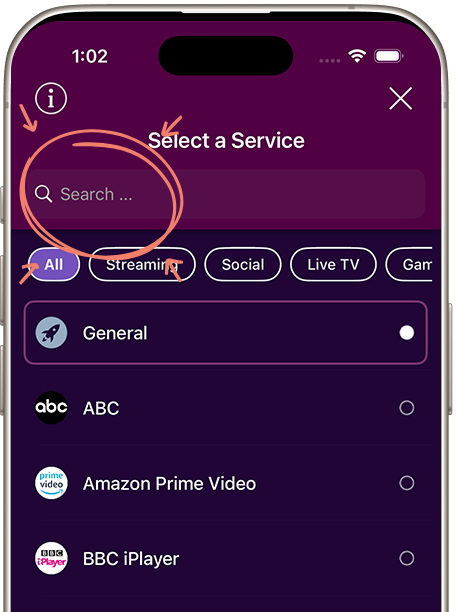
Search functionality included
Step 3: Search for SBS On Demand and Connect
STEP 3

Search for SBS On Demand

Open Services in Free VPN and look for SBS On Demand or SBS, then connect. Once connected, open SBS On Demand and sign in with your usual account if needed.

Check available routes in the app
One-tap connection
Confirm the connection status before browsing
WHY FREE VPN

Using a VPN with SBS On Demand

Choose a Nearby Location

Choose a nearby suitable location first. Shorter network routes often perform better, but speed varies by congestion, device, and internet provider.

Connection Privacy

A VPN encrypts traffic on the local network and changes the public IP address. It does not make an account or activity on SBS On Demand anonymous.

Check Account Eligibility

Use the location list to test a legitimate IP-location mismatch. Confirm that SBS On Demand is officially available for your account and selected country.

Access Can Still Vary

If you get a location, playback or connection message, reconnect in Free VPN and reopen the service. Our team checks service connections. If it persists, send us the exact message, your device and the selected service. Contact Free VPN support.

FREQUENTLY ASKED

Questions about SBS On Demand

Open Services in Free VPN and look for SBS On Demand or SBS, then connect. Once connected, open SBS On Demand and sign in with your usual account if needed.

Open Services in Free VPN and look for SBS On Demand or SBS, then connect. Once connected, open SBS On Demand and sign in with your usual account if needed. If a programme gives you a location or playback message, contact our team for help with the connection.
If you get a location, playback or connection message, reconnect in Free VPN and reopen the service. Our team checks service connections. If it persists, send us the exact message, your device and the selected service.

Set up Free VPN for your connection

Protect your connection, choose a suitable location, and follow SBS On Demand availability, subscription, and account rules.