VPN SERVERS • Mexico

Free VPN Servers in Mexico

Choose a Mexico VPN location, protect your connection on untrusted networks, and learn what a local public IP can—and cannot—change.

Mexico is listed under North America in the app. It is a practical choice for browsing with a local public IP, protecting traffic on shared Wi-Fi, or testing how a site behaves from this market.


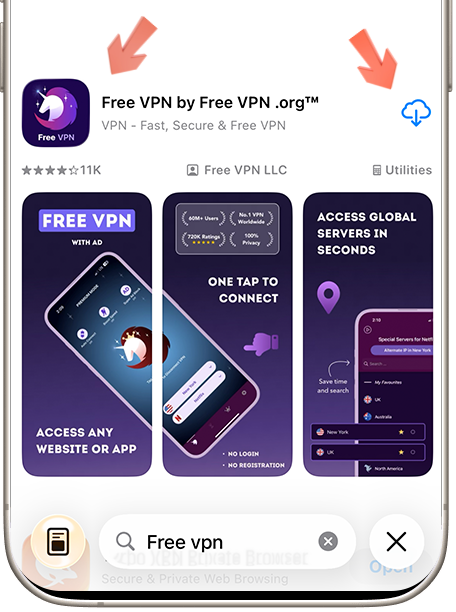
Step 1: Download Free VPN
STEP 1

Download Free VPN

Download Free VPN from the official store for your device. Review the current store listing for platform requirements, plan details, and privacy information before installing.

Available on Android, iOS & macOS
No registration required
100% free forever
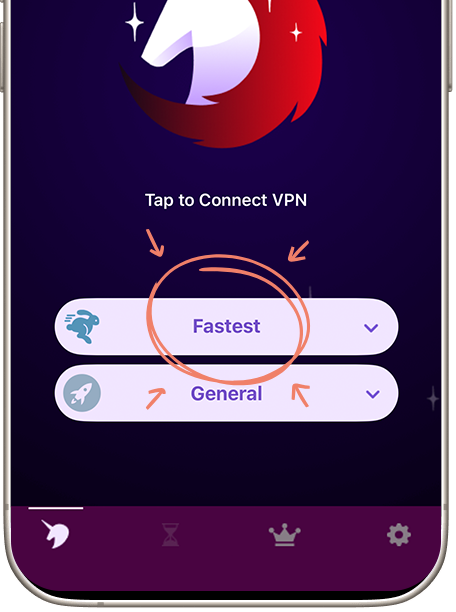
Step 2: Open Region Selector
STEP 2

Open Region Selector

In the Free VPN app, tap on the "Regions" button to open our comprehensive list of global server locations. You'll see all available regions organized by continents for easy navigation.

Global server network
Organized by continents
Real-time server status
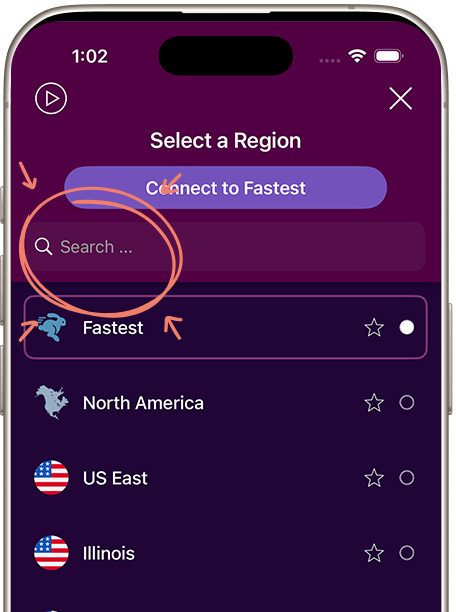
Step 3: Search and Connect to Mexico
STEP 3

Connect to Mexico

Find 'Mexico' under North America or use the region search. Select Mexico, wait for the app to show a connected state, then verify the public IP before continuing. Connection time and performance depend on the network and endpoint load.

Visible connection status for Mexico
Secure encrypted tunnel
Public IP associated with the selected endpoint
SERVER BENEFITS

Mexico Server Advantages

Ultra-Fast Speeds

Start with the nearest suitable Mexico endpoint. Latency and speed vary with distance, congestion, device, protocol, and internet provider.

Enhanced Security

The VPN encrypts traffic between your device and the VPN server, which helps protect it from other users on shared Wi-Fi.

Multiple Locations

This endpoint is listed under North America. Availability can change, so confirm the current location list in the app before relying on a specific endpoint.

24/7 Availability

If a route is slow or unavailable, reconnect or compare another nearby location. No endpoint can guarantee access to a third-party website.

FREQUENTLY ASKED

Questions about Mexico Servers

It routes traffic through the selected endpoint, so websites generally see that server's public IP instead of your current public IP. It does not change your account country, GPS, billing details, or every other location signal.

No speed is guaranteed. Performance depends on distance, congestion, device, VPN protocol, and your internet provider. Start with the nearest suitable endpoint and compare another location if needed.

No. Websites and services may apply account, subscription, legal, or VPN-detection rules. Check local law and the provider's terms and current availability.

Wait for the app to show a connected state, then check your public IP with a reputable IP lookup. If the result is unexpected, reconnect or select another available Mexico location.

Ready to Connect to Mexico?

Choose an available Mexico endpoint, verify the connection, and use third-party sites in line with local law and their terms.