Regions chooses a place; Services chooses a route
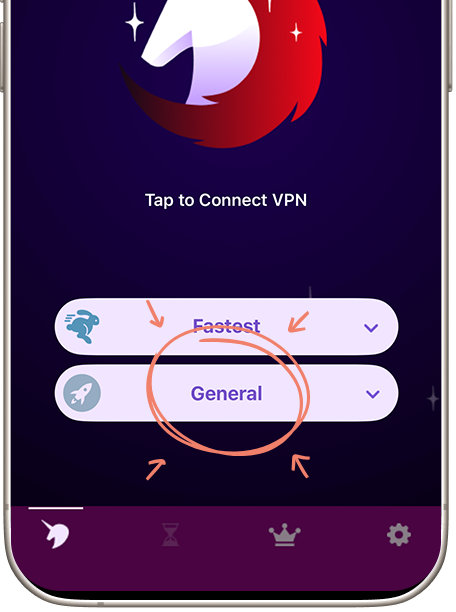
Free VPN's mobile interface separates the region selector from the service selector. Regions chooses your VPN location, with options such as US East, US West, UK, Germany and Japan. Services lets you choose streaming, live TV or the specific service you want to use. General is the starting point for ordinary browsing; select the streaming or live-TV service for your viewing session.
Netflix, Apple TV, Prime Video, BBC iPlayer, ITV, ABC and SBS are examples of streaming and live-TV services available in the app. For music and audio, Services also includes Spotify and BBC Sounds. Open Services, choose the service, select your region and connect. Your streaming account or subscription remains with that service.
The Services screen highlights the mobile activity selector. The service choices shown there are available inside Free VPN.
Why the same route can work today and fail later
VPN exits may be shared by many users. A streaming service can recognize an address as a VPN route and apply its own rules. Network changes, service changes and account restrictions can also affect what you see. A failed title does not automatically mean the VPN tunnel is broken.
Content rights are another layer. A catalog can vary by location, and a title can be unavailable even on a normal connection. Your account's subscription or plan may restrict playback independently of the network route. Changing the VPN setting does not create rights to a title or alter the streaming service's terms.
Netflix's VPN help page explains its own VPN-related viewing restrictions, including limitations for ad-supported plans and live events. Other services have different rules. Use the help page for the actual service you are using instead of treating every streaming error as the same problem.
Diagnose the symptom before changing settings
| What you see | First useful check | What it may tell you |
|---|---|---|
| Nothing loads, including normal sites. | Check the underlying internet connection, then Free VPN's connected state. | The issue may be connectivity rather than a catalog rule. |
| A VPN or proxy error appears. | Read the streaming platform's exact error and VPN help. | The route may be recognized or restricted. |
| One title is missing. | Check title availability, your account and the service's regional rules. | A working connection does not guarantee that title. |
| Playback buffers. | Compare the same task on the same network; check other downloads. | Congestion or route performance may matter. |
| Login or page controls fail after Ad Block changes. | Isolate the filter setting. | A blocked request may be affecting the page. |
Take a note of the exact wording. “Cannot connect,” “title unavailable” and “VPN detected” point to different next steps. Avoid changing region, service, filtering and network all at once; that makes the result harder to interpret.
A sensible Free VPN troubleshooting sequence
- Confirm that the device has an ordinary internet connection. At a hotel or airport, complete the legitimate Wi-Fi portal first.
- Open Free VPN and check its active state, selected region and available service option. Check whether the free-session allowance is still active.
- Verify the streaming account, plan and title in that service's own help. A VPN connection does not include a streaming subscription.
- Select the relevant service in Services, connect and recheck the same title.
- If one optional setting is causing a problem, compare that setting alone. Keep the service's rules and any platform error in view.
On desktop, our CLI offers freevpn status and freevpn doctor for reported state and connection diagnostics. They can help explain a network failure but cannot certify whether a streaming platform will permit a given title.
If a service explicitly restricts the VPN route, follow its help and use a permitted connection. Check the specific error before changing another setting. See the public Wi-Fi guide if the underlying network is the uncertain part.
Use Boost Speed and Ad Block
Boost Speed lets you apply connection optimization, and Ad Block reduces known advertising and tracker requests while enabled and connected. Those controls have useful jobs, but neither is a guarantee that a streaming platform will accept a VPN address.
Read the current Free VPN access screen before upgrading. Premium features and uninterrupted VPN time may be useful for a longer session, but a Free VPN purchase does not buy access to another platform's catalog or override its plan restrictions. Mobile ad-supported access and our Windows free-session model also differ.
For persistent connection problems, contact Free VPN support with the platform, app version, selected route and exact error. Do not send a streaming password, payment details or a full account screenshot. For a title or subscription issue, the streaming platform is the source of truth.
Your service is missing? Request it
Free VPN provides hundreds of services across a network of thousands of servers. If the streaming or live-TV service you need is not listed in your app, send our team a request with the service name, desired region and device. We work on adding requested services and regions on demand.
Tell us which service and region you need, along with your device. Our team works on adding connection options on demand. Streaming subscriptions remain with the streaming provider.
Get help with your connection
Free VPN provides your VPN connection, Regions and Services. Your streaming subscription remains with the streaming provider. For help with a VPN connection, contact our team with the service, region, device and error message.
Our privacy guide also explains why a streaming account can still recognize you when the VPN changes your public IP. The connection does not log you out or erase the account's viewing history.
Free VPN at a glance
NO LOGS. NO LOGINS. We do not log your browsing activity. No Free VPN account, login or email registration is needed to use the VPN.
- Simple setup: Install Free VPN, approve the VPN profile or system connection permission, and connect. Desktop clients follow their supported installer and service setup.
- Free VPN time: Watch ads to get VPN time in our mobile apps. Free access is real; a paid upgrade is optional if you prefer not to watch ads. Desktop clients have their own published access terms.
- Built-in controls: Auto-connect, Boost Speed, System-wide Ad Block. System-wide Ad Block filters known ad and tracker requests across apps while enabled and connected, rather than only inside one browser.
- Our network: Thousands of servers. Hundreds of services across AI, social, streaming, live TV, gaming, music, sports and more. Open Regions and Services in the app, choose what you want to use and connect.
- On-demand requests: Missing a service or region? Tell our team what you need and we will work on adding it on demand. Request a service or region.
- Your devices: Android, iPhone / iPad, Mac, Windows, Linux and CLI.
Read our privacy policy for no-logs and advertising details. Watch ads to earn mobile VPN time, or choose an optional paid upgrade if you prefer not to watch ads.
Streaming questions
Does Free VPN include a Netflix or other streaming subscription?
No. You need the service's own account and subscription where required. A Free VPN service preset changes an available network route; it does not supply content rights.
Are the listed services available in the app?
Yes. The services and regions shown on our website and app screens are available inside Free VPN. Open Services, choose the service and region, and connect. Use your own streaming account or subscription where the streaming platform requires one.
Should I buy premium solely to fix a VPN-detected error?
Do not treat that as a guaranteed fix. Check the platform's help and your plan first. Premium Free VPN features do not override another service's playback rules.
Why does one streaming site work while another fails?
Services can use different catalogs, account rules and VPN detection. Confirm the specific error and service policy rather than assuming every platform handles the same route identically.