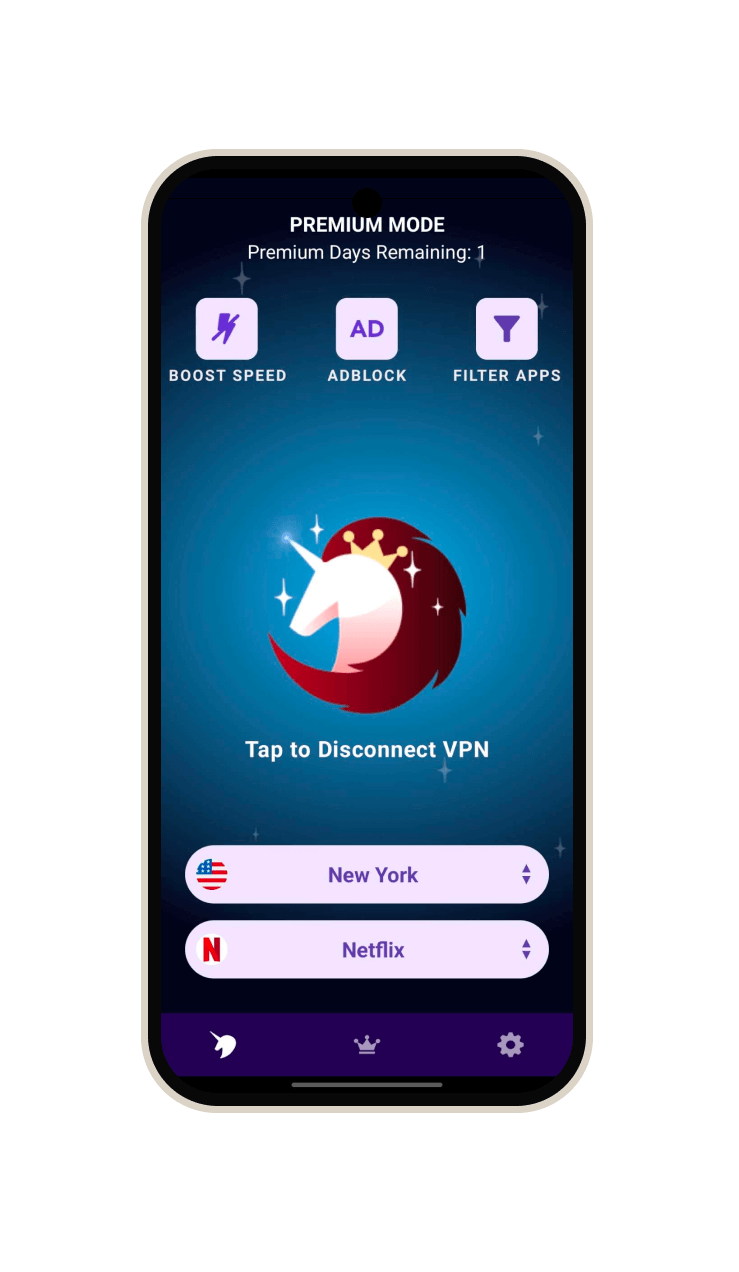
What Free VPN gives you on Android
Your phone does more than browse the web. It runs messages, games, work apps and background requests, often on the same connection. Free VPN routes supported traffic through an encrypted tunnel and changes the public IP address destinations see. Use the same app on Wi-Fi and mobile data. There is no Free VPN account to set up.
The useful part is control. Our Android interface brings the connection, region and service choices into one place. You can connect first, then decide whether a particular app needs another route. You do not need to configure a separate VPN profile or copy server credentials from a tutorial.
| Control | How it helps | What to check |
|---|---|---|
| Fastest and Regions | Start with automatic routing or choose an available location. | Select the region you want to use. |
| Services | Select a route for an activity or supported service. | Choose the service you want to use. |
| Ad Block | Filter known advertising and tracker requests while connected. | Turn Ad Block on to apply filtering. |
| Filter Apps / Bypass VPN | Let selected Android apps use the direct connection. | An excluded app is outside the VPN tunnel. |
| Boost Speed | Try an optional connection optimization. | Compare your own connection; an improvement is not guaranteed. |
Our Android app screen shows Boost Speed, Adblock and Filter Apps. These controls are in the app and you can use them to manage your connection.
Install the right app, then make your first connection
- Open Free VPN on Google Play from this website. The package identifier is org.freevpn and the publisher is Free VPN LLC.
- Install and open the app. Choose free access and watch ads to get VPN time. You do not need to start a paid trial; use the time options displayed in your version.
- Approve the VPN profile or connection setup when Android asks. Read the system VPN permission request; it allows Free VPN to create the connection.
- Keep Fastest selected and use the connect control. Wait for the app to report a connected state before opening the apps you want to use through it.
- Load a familiar HTTPS page, try your usual app and confirm that normal connectivity returns when you disconnect.
Android's own VPN settings help explains the operating-system connection controls. If another VPN profile is already active, check that configuration before troubleshooting Free VPN. On a work-managed phone, follow your administrator's requirements.
Regions and Services do different jobs
Regions chooses your VPN location, with options including US East, US West, Germany, Japan and South Africa. Services chooses an activity or service route. General is a sensible starting point for ordinary browsing; select the mode for your task. Changing one setting at a time makes it easier to see what helped.
Free VPN includes services for AI, social, streaming, live TV, gaming, music and sports inside the app. Select ChatGPT or Gemini for AI; X, Instagram, TikTok or Reddit for social; Netflix, Apple TV, Prime Video or BBC iPlayer for streaming and live TV; PUBG Mobile for gaming; or Spotify and BBC Sounds for music and audio. The services and regions shown on our website and app screens are available in Free VPN: open Services, choose what you want to use, select your region and connect. You still use your own account or subscription for services that require one.
For games, start with our mobile gaming guide instead of assuming that a farther-away region will lower ping. For a blocked video, use the streaming troubleshooting guide to separate the connection from the streaming account's restrictions.
Use the Android controls deliberately
Ad Block and app filtering solve different problems. Ad Block reduces known ad and tracker requests. Filter Apps changes which applications use the VPN at all. If you exclude a banking app because it needs your ordinary connection, remember that its traffic no longer takes the Free VPN route. Check exclusions again before using public Wi-Fi.
The Android release notes also list Kill Switch and Always-on VPN. Review the controls available on your device and Android version before relying on connection-drop behavior. These are Android-specific references; do not assume that an iPhone, Mac or Linux client presents the same switches. Android's settings help is useful when checking system VPN behavior.
Use Boost Speed to optimize your VPN connection. Test the same task on the same network with one change at a time. If an app or page stops working after enabling filtering, isolate that setting first rather than changing region, service and network together.
Free access and premium: choose what fits your use
You can start the mobile free tier without a Free VPN account, email or card. Advertising supports that access. Optional paid upgrades offer a different experience, including an experience without watching ads. Read the price, renewal period and included features in your own app; plans and offers can vary by platform and store region.
No signup is convenient, but it is not a claim of complete anonymity. We do not keep browsing-activity logs; our privacy policy explains the free tier's advertising services. The Trust Center connects those declarations with the official product identity. Websites you log into can still recognize your account.
Free VPN at a glance
NO LOGS. NO LOGINS. We do not log your browsing activity. No Free VPN account, login or email registration is needed to use the VPN.
- Simple setup: Install Free VPN, approve the VPN profile or system connection permission, and connect. Desktop clients follow their supported installer and service setup.
- Free VPN time: Watch ads to get VPN time in our mobile apps. Free access is real; a paid upgrade is optional if you prefer not to watch ads. Desktop clients have their own published access terms.
- Built-in controls: Auto-connect, Boost Speed, System-wide Ad Block. System-wide Ad Block filters known ad and tracker requests across apps while enabled and connected, rather than only inside one browser.
- Our network: Thousands of servers. Hundreds of services across AI, social, streaming, live TV, gaming, music, sports and more. Open Regions and Services in the app, choose what you want to use and connect.
- On-demand requests: Missing a service or region? Tell our team what you need and we will work on adding it on demand. Request a service or region.
- Your devices: Android, iPhone / iPad, Mac, Windows, Linux and CLI.
Read our privacy policy for no-logs and advertising details. Watch ads to earn mobile VPN time, or choose an optional paid upgrade if you prefer not to watch ads.
Android questions, answered
Do I need a Free VPN account on Android?
No. You can start the free tier without a Free VPN account, email address or payment details. A Google account used for Google Play is separate from a Free VPN signup.
Can I exclude one Android app from the VPN?
Our Android app documents app filtering to bypass selected applications. Use Filter Apps or Bypass VPN to select the applications you want to exclude. Excluded applications use the direct connection rather than the VPN tunnel.
Does Ad Block remove every advertisement?
No. It filters known advertising and tracker requests while enabled and connected. It does not remove every embedded ad or erase account-based tracking.
Can Free VPN make Android gaming faster?
A different route may help on a particular network, but it can also add latency. Compare ping, disconnects and stability on the same game server before deciding. There is no universal gaming speed guarantee.